Excel MarkBook
VLOOKUP Function continued...
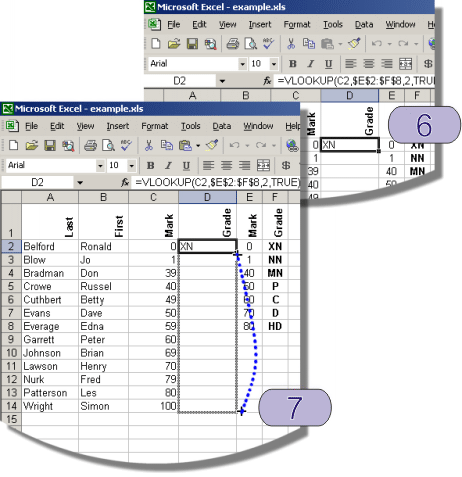
5 Use autofill to copy the VLOOKUP function into
each cell in column
D.
6 Click on cell
D2
7 Drag the autofill handle to cell
D14
Theory:
The VLOOKUP function has the following syntax:
VLOOKUP(lookup_value,table_array,col_index_num,range_lookup)
In this example we are using the following
=VLOOKUP(C2,$E$2:$F$8,2,TRUE)
lookup_value is
C2, this means that the mark in cell
C2 will be used as the lookup
value and the appropriate grade will be returned from the table.
table_array is
E2:F8, this is the location of the lookup table. Note the
$ signs lock
the position of the lookup table when using autofill to copy the VLOOKUP function
in step 6.
col_index_num is 2, this means the second column in the lookup table_array is
the value to returned.
range_lookup is TRUE this means match a range of values eg marks between 50 and 59 will return a grade of
P.